CrashLoopBackOff: why a pod keeps restarting
CrashLoopBackOff means a container starts, exits, and Kubernetes waits longer and longer before starting it again. The status is a symptom; the cause is in the exit code, the logs of the previous run and the pod's events.
What CrashLoopBackOff means
When a container exits and the pod's restartPolicy is Always (the default for Deployments), the kubelet restarts it. Each new crash doubles the wait (10 s, 20 s, 40 s … up to 5 minutes). While waiting, the pod shows CrashLoopBackOff. Nothing is wrong with Kubernetes itself: the process in the container keeps ending.
Find the cause with kubectl
- See the restart count and the last state.
kubectl get pod <pod> -n <ns>, thenkubectl describe pod <pod> -n <ns>. Under Last State: Terminated look at Reason and Exit Code. - Read the logs of the run that crashed, not the current one:
kubectl logs <pod> -n <ns> -c <container> --previous. The last lines usually name the error. - Check the events at the bottom of
describeor withkubectl get events -n <ns> --field-selector involvedObject.name=<pod>: failing probes, mount errors and image problems show up here.
Common exit codes
| Exit code | Usually means | What to check |
|---|---|---|
1 | The application failed (unhandled error) | The previous logs: configuration, a missing environment variable or secret, a database that cannot be reached. |
137 | Killed with SIGKILL, very often OOMKilled | Memory limit vs real usage. See OOMKilled. |
139 | Segmentation fault | A native library or binary built for the wrong architecture. |
143 | Stopped with SIGTERM | A liveness probe that fails, or a shutdown that takes longer than the grace period. |
0 | The process finished normally | The command is not long-running (a script that ends). Use a Job for one-off tasks. |
Frequent causes and fixes
- Missing configuration: a ConfigMap key, Secret or environment variable the app needs. Fix the manifest and roll out again.
- Liveness probe too strict: the app needs longer to start than the probe allows. Add a
startupProbeor raiseinitialDelaySeconds/failureThreshold. - Dependency not ready: the app exits when a database or service is not reachable yet. Retry in the app, or wait in an init container.
- Not enough memory: exit code 137 with reason OOMKilled. Raise the limit or reduce usage.
- Wrong command or image: a typo in
command/argsor an image built for another platform.
The Kubby way
Kubby puts crash-looping pods at the top of Overview and Pods. Open the pod and the Why is it restarting? panel already shows the last exit code, the reason, for OOMKilled the memory limit and usage, and the restart pattern. Logs before crash opens the previous run's logs with the termination reason after the last line.
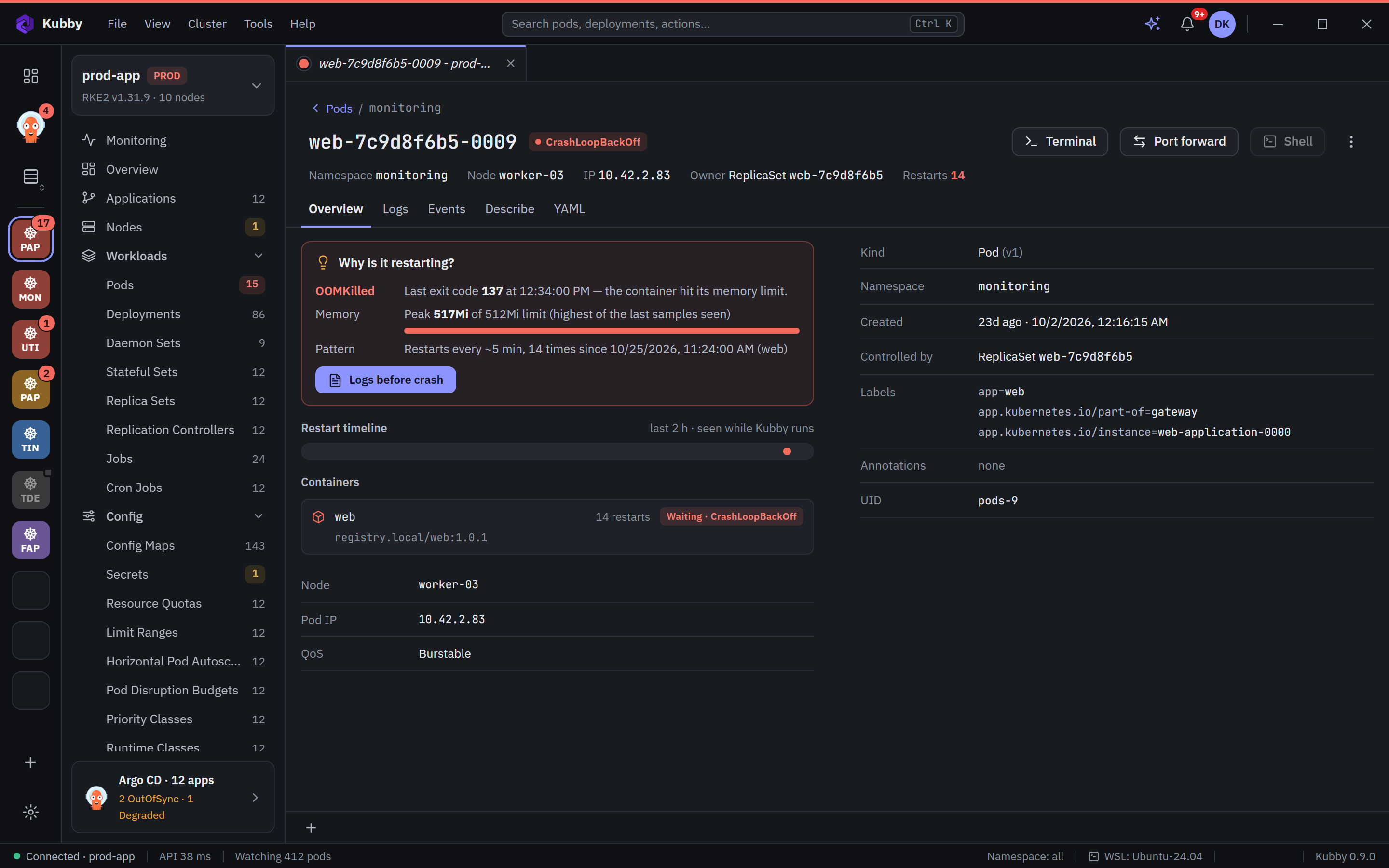
With Ask Kubby, ask "why does this pod keep restarting?": it reads the describe output, events and previous logs and proposes a fix you approve.