Cluster health score
Each cluster gets a grade from A to F and a score out of 100, with the findings that cost the most points first.
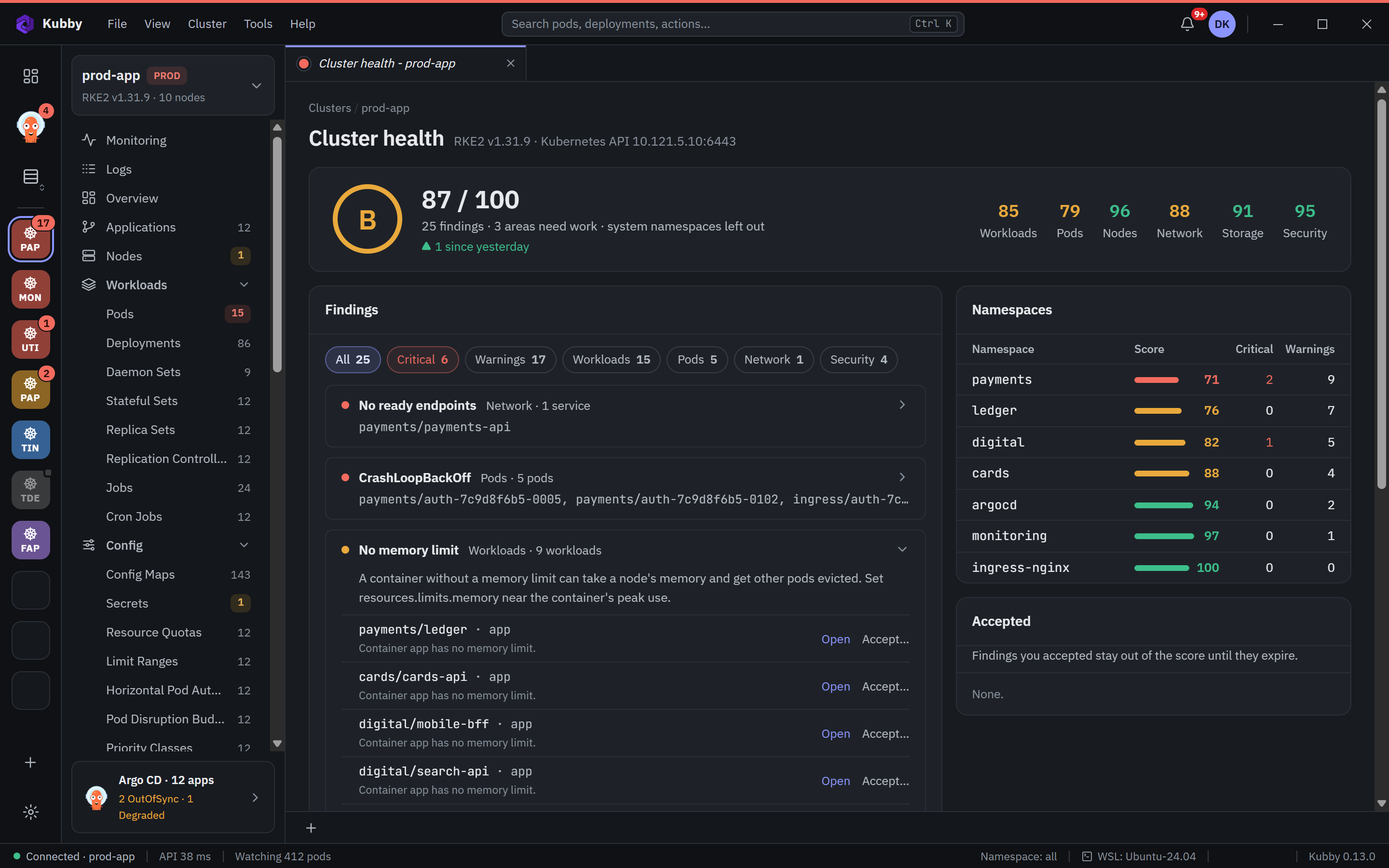
The health card
The Cluster health card on the Overview shows:
- Grade and score: A from 90, B from 80, C from 70, D from 60, E from 50, then F.
- Since yesterday and a 30-day trend. Kubby records the score every hour while it watches the cluster.
- By area: workloads, pods, nodes, network, storage and security, each with its critical and warning counts.
- Fix first: the five groups of findings that cost the most. Click one to open it on the Cluster health page.
How the score works
Every object counts once in each area, at its worst finding: a critical finding counts 0, a warning 0.6, an object without findings 1. An area's score is the average, and the cluster score weighs the areas: workloads 25, pods 25, nodes 15, network 15, storage 10 and security 10. Areas without objects are left out. An area Kubby has no right to read says Not checked instead of counting.
What Kubby checks
- Resources: containers without a memory limit or without requests.
- Images: images without a fixed tag (
:latest), and images from registries outside your allowed list. - Probes: no readiness probe, no liveness probe.
- Security: privileged containers, containers that run or may run as root, host network, PID or paths.
- References: ConfigMaps, Secrets and service accounts a workload needs but that do not exist. Kubby reads only their names, never their contents.
- Workloads: no ready pod, fewer ready pods than wanted, scaled to zero.
- Services: services that select no pods, have no ready endpoints or point at a port the pods do not expose.
- Disruption budgets: PDBs that select no pods or block node drains, workloads without a PDB.
- Nodes: cordoned nodes.
The Cluster health page
All findings opens the page: findings grouped by rule with filters by severity and area, the score of each namespace, and the findings you accepted. Each finding has Open, which opens the object, and Accept….
Accepting a finding
Some findings are on purpose, for example a monitoring agent that needs host access. Accept… leaves a finding out of the score for this object, its namespace or the whole cluster. A reason is required and an end date is optional; after the end date it counts again. Accepting and undoing are written to the audit log.
Settings
In Preferences → Cluster health:
- Namespaces left out: kube-system, kube-public, kube-node-lease, cattle-*, fleet-*, cis-operator-system and local-path-storage by default. A trailing * matches a prefix.
- Allowed image registries: for example
harbor.bank.local. When the list is empty, every registry is allowed.
The health score reads the cluster with your permissions; nothing is installed in the cluster.